NuPhy’s had one hell of a year. Slowly but surely, they’ve been closing in on Wooting — yeah, that Wooting. The gap isn’t what it used to be. Their magnetic keyboards have improved with every drop, snappy, responsive, and surprisingly refined for a company that wasn’t even in the magnetic game that long ago. But there was always one thing holding them back — plastic. No matter how good, every board still had that lighter, less premium feel.
Well, not anymore. The NuphyX BH65 changes that. This thing’s full aluminum, solid as a rock, and ready to throw down with the big boys. Let’s check it out.
Disclaimer: This unit was sent to me for review, however, the opinions are mine only.
Specs and Features

Unboxing and Sound Test
In the box you will find:
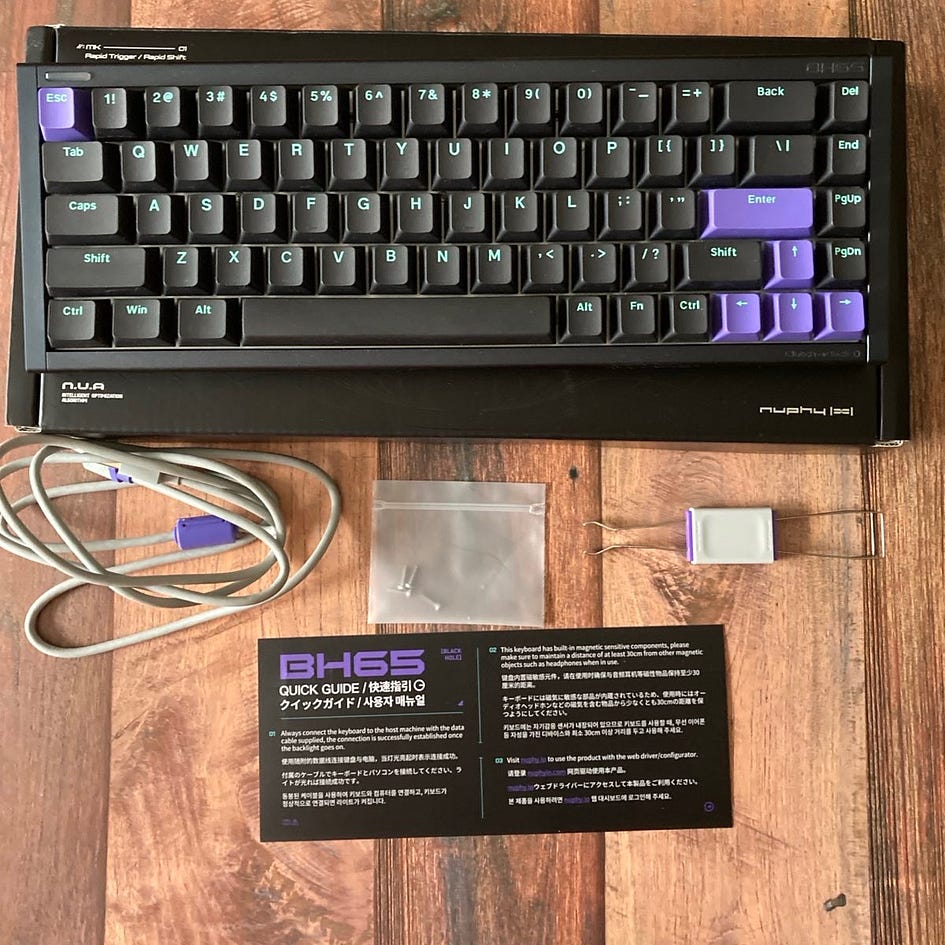
- NuphyX BH65 wrapped up in a plastic sleeve
- USB-A to C cable
- keycap/switch puller
- 4 screws (for 3D-printed parts)
- Quick guide
- extra spacebar (Ghost Bar)
I didn’t find spare switches in my box.
Bottom line? I wish I had spare switches, but the rest is fine, and the Ghost Bar is a nice addition.
Design and Build Quality
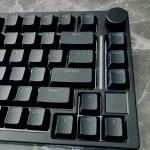
NuPhy stepped it up with the BH65. After sticking to plastic builds for their previous boards (still excellent quality though), this one feels like a different league entirely. The aluminum case is solid, no flex, no creaks — just a proper, weighty piece of hardware. The 220 mesh pattern on the body gives it a slick, industrial look that catches the light just right without being flashy. You can tell they paid attention to detail this time: the finish is clean, the edges are smooth, and everything sits where it should. Only some screws here and there hint that it’s not a completely uniform object, it’s that solid.

The layout is compact — 65% — but still feels roomy enough for daily use, and the PBT keycaps have a nice texture that doesn’t get shiny after a few days. Typing on it feels crisp thanks to the Gateron Jade Gaming magnetic switches, which are fast and snappy, perfect for gaming or just banging out emails. The keyboard does not feature a Windows/Mac toggle, nor a profile toggle anymore (you can do that via software or keyboard shortcuts, though). There are no kick-out feet anymore, either — this time the typing angle is set for good at 6 degrees.

The structure is tray-mounted, a bit stiff, but it absorbs shock. Two LED bars are pre-installed on both sides of the keyboard, and there’s also an LED bar in the top left corner (for different functions like CAPS LOCK, etc). It all adds to the metallic, futuristic, and sleek look. This part of the keyboard can be customized using 3D-printed accessories. This allows users to personalize their keyboard with custom designs, adding a personal touch.
A few people have mentioned some quirks, like the spacebar being a bit off in profile and the stabilizers not being top-tier, but those are nitpicks more than dealbreakers. Overall, the BH65 is easily NuPhy’s most serious board yet — built like a tank and finally looking and feeling very premium.
Bottom line? The most premium-built keyboard from Nuphy.
Switches

The Jade Gaming switches pack a serious punch. For daily work and gaming, these switches feel different than Jades Pro (a bit stiffer to press than the regular Jades, though), still delivering a smooth typing experience. Yet, every keystroke still feels light and effortless, making long typing sessions a breeze. Their sound is a bit on the clackier side while Jades Pro are more silent.
However, do not forget that your typing experience may depend on your keycaps too, and I prefer lower keycaps to type with — I think that’s why I make typos here and there. Feel free to experiment in this aspect.

The switches are box-mounted, well-lubed, and very stable. They are made of a very solid material, however, the RGB can pierce through it, and you may see some reddish hue illuminating from the sides of the keycaps.
Bottom line? Jades Gaming are stiffer to press and louder than Jades Pro, however, I think I prefer them when it comes to gaming.
Keycaps

The keycaps are the same as used in Field75HE, so they are designed in the cherry profile, which is well-known for its lower height and comfortable shape, making it good for both gaming and typing. Made from PBT material, the keycaps are durable, with double-shot legends that keep the text clear and readable over time. The surface feels nice to the touch and is resistant to grease and scratches, helping it look clean even after long use.

However, these keycaps are not shine-through, which could be an issue for some, especially when gaming at night. I often wished for better visibility in low-light conditions. Unfortunately, NuPhy still lacks enough alternatives in this category, offering only their Canopus options for those who seek shine-through keycaps.
Bottom line? Good keycaps with good texture, but shine-through ones would be even better.
Software
A high-end keyboard is never complete without strong software to reach its best performance, and the BH65’s case is similar. Actually, this software is not something just extra — it is the main thing that makes this keyboard so powerful. And from my last review on Air75HE, it has received a few updates (the dev team updates it around once a month).

I won’t sugarcoat it because bugs happen here and there – something some profiles won’t import properly, and the overall UI could be more intuitive here and there. But here are things you can do via software:
- SOCD (Simultaneous Opposite Cardinal Directions): For gamers, especially those playing fast-paced shooters like Valorant or Quake, this feature is a game-changer. SOCD enhances your strafing by allowing precise movement inputs, improving your control in-game. Although it’s banned in some games like CS2 due to the advantage it gives, in games where it’s allowed, it’s an absolute must for serious players.
- Rapid Shift (Rappy Snappy Equivalent): NuPhy’s software offers Rapid Shift, their equivalent of the popular Rappy Snappy feature. This feature allows for near-instantaneous key response changes, making it perfect for competitive gaming, where speed and precision are critical.
- Hyper Tap (Rapid Dual Trigger Equivalent): Perhaps the most impressive gaming feature is Hyper Tap, which is NuPhy’s answer to DrunkDeer’s Rapid Dual Trigger. Hyper Shift counter-strafes your key input, making it incredibly useful for games like CS, where timing your movement is crucial. Frankly, it feels almost overpowered, giving you a serious advantage by perfecting your strafing in intense combat scenarios.
- 8K Polling Rate & 16000Hz Scan Rate: The software enables an impressive 8000Hz polling rate and an 8000Hz scan rate for the keyboard, something rarely seen among competitors. While many hype up the 8K polling rate, NuPhy’s development team has delivered an 8K scan rate, which is more critical for delivering faster input times than the polling rate.
- Rapid Trigger and Actuation Point customization with 0.01mm accuracy: The software allows for Rapid Trigger and Actuation Point customization with a precision of 0.01mm (RT) and 0.1 mm (AP), giving users unparalleled control over their key actuation points. This level of accuracy is perhaps even too precise for FPS gaming, but I am sure some will appreciate it. One small nitpick: it resets to default 0.01 mm even after I set it to 0.1 mm once I try to customize another key. A bit annoying.
- Dead Zone configuration, switches recalibration (you might have to do this after a new update is released), DKS, Mod Tap, and Toggle Key features.
- Tick rate (for games that may require it, like CS2), anti-wobbliness switches level and gaming optimization — all to enhance your gaming experience and reduce errors and obstacles that may come in your way
- Comprehensive Customization: Of course, the software also includes all the standard customization options you’d expect from a high-end keyboard — key remapping, macro creation (added recently), RGB adjustments, and more. The ability to assign macros and remap keys is intuitive, allowing you to tailor your layout to suit your workflow or gaming style seamlessly.
- Auto-calibration: Nuphy calls it N.U.A second-generation self-developed magnetic switch algorithm. It’s a solution a lot of tech brands use in magnetic boards these days to help you forget about self-calibration. I suggest you do it every time you swap switches or a new update of the nuphy.io firmware rolls out.
There’s one more thing you need to know — some people from CS reported to me that Nuphy’s SOCD is not detected by the server software. I checked in Quake on my side, and it is true — it is indeed undetectable. That’s something you have to know before purchasing this keyboard.
Bottom line? The software has stepped up big time, it’s very powerful and useful now. Minor bugs may still happen, though.
Latency and Performance

The BH65 cuts no corners when it comes to speed. With an 8000Hz polling rate and a crazy-fast 16,000Hz scan rate on the PCB, every key press gets picked up almost instantly — no lag, no delay. It’s built for games where timing matters — FPS games, racing games, OSU games. The magnetic switches also fire fast and feel super precise, which helps when you’re trying to land those quick inputs under pressure. The declared latency is 0.125, but in the real-world scenarios, it registered a slightly higher value, around 0.18 ms on average. It’s still among the absolute best results in 2025.
My gaming was smooth, my moves were fast, everything was responsive, no chokes, no lags, no key rollover. Nuphy BH65 never failed me, not even once.
You might wanna play a bit with the Dead Zone settings — the software allows you to set even the zero Dead Zone, however, there was still some very small zone where I registered some slight irregularities. But nothing to worry about.
Bottom line? Top performance, fast and reliable keyboard with minimal delay that you won’t even notice.
Summary
This is my second NuPhy board after the Halo65HE, which also had that compact 65% ANSI layout. Just like before, it clicked with me pretty fast — didn’t take long to get comfortable. Once I got deeper into gaming on it and messed around a bit with the NuPhy.io software, I realized they nailed it again. The board just feels great to use. Sure, the software still needs some tweaks — nothing major, but a bit of refinement wouldn’t hurt. That said, in almost all areas, it already edges out Wooting.

The build is all aluminum, nice and solid, and the switches are super responsive. The keycaps feel top-tier, too. Altogether, the performance you’re getting here for the price is honestly wild. Mid-2025, I don’t think you’ll find anything better under $150. And if you’ve got my discount code (“airmathe”), it gets even more ridiculous, especially considering the Pro or Gaming Jades alone go for around 60 bucks. No-brainer recommendation from me. This is hands down NuPhy’s best magnetic keyboard so far.
Bullet Points
- The most premium keyboard by Nuphy so far
- True 8k polling and 16k scanning rate with minimal latency
- Great Gateron Gaming switches
- very potent software that is still undetected in some games (but still no analog mode)
- Incredible build quality
- No profile switch anymore (you do it via keyboard shortcuts now)
- 0.01 mm Rapid Trigger accuracy works well

- South-facing RGB might have some purple hue sometimes (due to the material used for the switches)
- hot-swappable to a few types of magnetic switches
- Only wired due to performance demands
- GhostBar is doing a great job of dampening the sound
- very sleek, ultra compact, great looking
- Fine keycaps, but I still miss a shine-through alternative
Get your Nuphy BH65 HE with the code “airmanthe” to save some bucks!
Disclaimer: This review is not a paid endorsement. I want to ensure transparency and let you know that I am not receiving any compensation, monetary or otherwise, for evaluating or discussing this tech product.