*Disclaimer – This pad was sent to me by Aula. Everything in this review is my own personal opinion, and Aula had no involvement or influence in it, nor did they see this review before it was published*
An $80 Budget Banger - Aula F75 Max
Ive tested this keyboard for the last two weeks, I’ve gamed with it, brought it to work with me, and one aspect of this keyboard has really impressed me.
Lets start off with the specifications:
- $80
- 80 keys, Compact layout
- Gasket Mounted with 5 Layers of Sound-Dampening Materials
- Bluetooth 5.0 Wireless/Wired Keyboard With 4000mAh Battery
- TFT Screen: The Gif-showing screen Interface
- South-facing RGB Backlight
- LEOBOG Reaper Mechanical Switch
- Case Material ABS Plastic
Unboxing

The Aula F75 Max comes packaged in a simple box, upon opening you’re greeted with a manual and quick operation guide, beneath which rests the keyboard itself under a dust cover and in a thin transparent plastic sleeve. Included comes two extra switches and a keycap puller, as well as a cable. The presentation isn’t anything special, nor are there any accessories, but everything you may need is included. I don’t have any complaints with the unboxing, at the price point of $80 I would hope as much money as possible would go into the keyboard rather than being impressed by packaging or extra accessories.
Build


The F75 Max is made of ABS plastic, its construction feels very solid, with no creaking, and very slight flex when applying abnormal pressure. The keycaps feel premium, the knob has a pleasant metallic feel, and the typing experience is superb. In my opinion the only thing keeping it from being a premium keyboard is a metal case, but I doubt that would be possible at this price point.
The Aula F75 Max has a 75% layout, I prefer a compact keyboard for gaming and this keyboard was compact enough for me to use while gaming, while being versatile enough to have keys I need for work, like the F-key row.
In terms of functionality the F75 Max has a knob as well as TFT Screen. Regarding their build, I feel like I would prefer if the knob would be a bit stiffer with better defined steps, the knob is used to change keyboard settings on the TFT screen, I believe it would be slightly easier to navigate if the steps weren’t as light. I can’t necessarily call this a complaint since the light scroll of the knob may make it harder to navigate and accurately select settings, it makes it very pleasing to control the volume.
The TFT screen may not be the brightest but I have no issues with visibility under very bright conditions, and its viewing angle is wide enough for the screen to be clearly readable at every angle you’d be using a keyboard. In the future I do think a brighter screen would be a nice improvement.
The keyboard has two sets of feet to adjust the typing angle, all of them have rubber pads to ensure the keyboard stays in one spot. I haven’t had any issues with this keyboard moving while typing or easily sliding on my desk despite my desk being quite smooth.
Overall I’ve had no QC issues and the build feels high quality.
Typing Experience & Switches

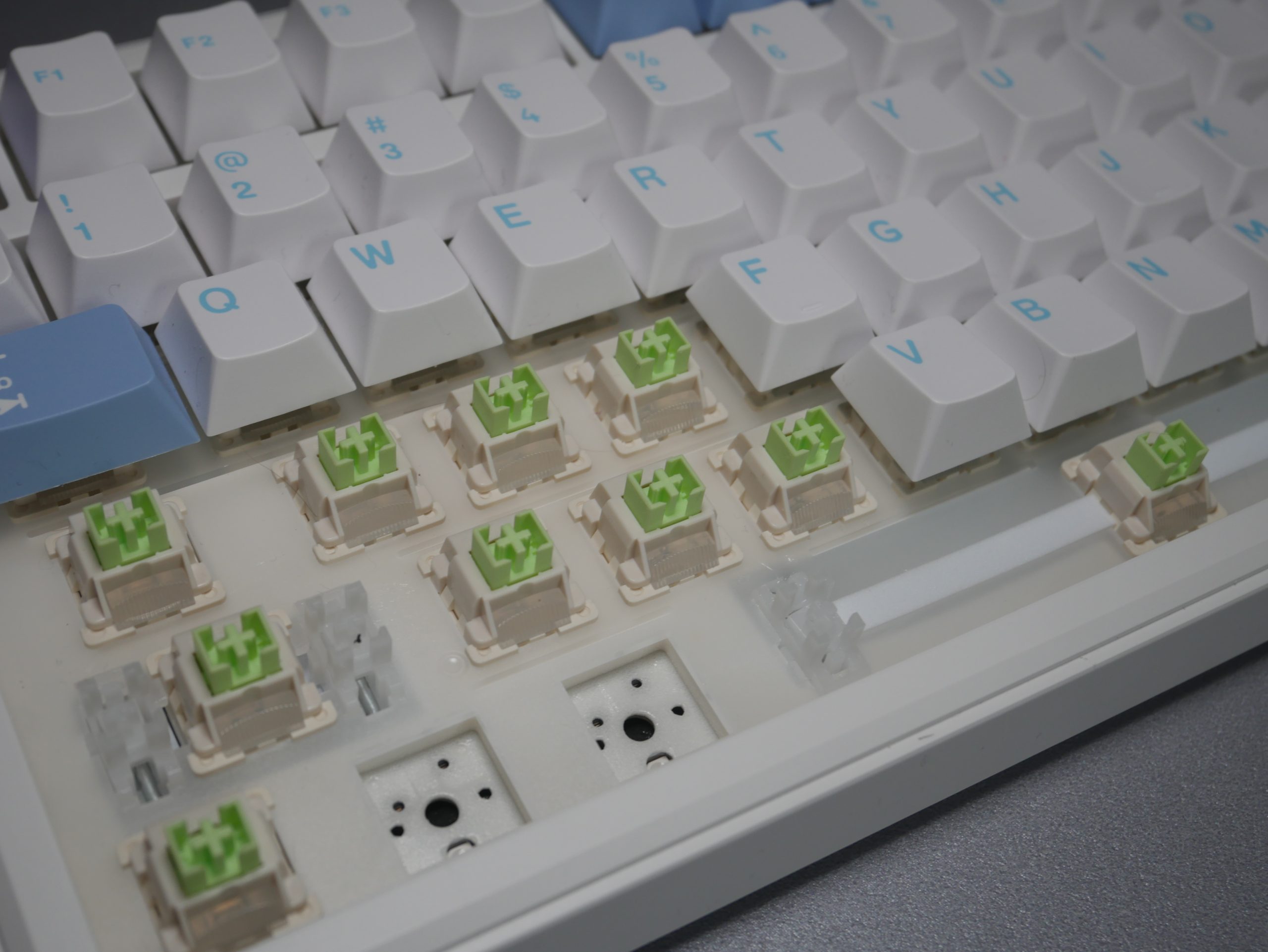
In my opinion the typing experience is the main attraction, and in addition its quality and features such as the screen and the knob is the reason to get this keyboard. It’s factory lubed and tuned, gasket mounted with foam and silicone sandwiched between plate, PCB and bottom case, providing a very delightful typing experience.
The Gasket mount is done well, it provides a slight bounce making the overall typing experience softer. Aula also added foam dampening underneath the space bar, giving it a quieter and softer feel. Overall the typing feel straight out of the box is fantastic.
Switches - LEOBOG Reaper
| Technical Specifications | Details |
|---|---|
| Switch Type | Linear |
| Pin | 5 Pins |
| Factory Lubed | Yes |
| Material | POM Stem, PC Top & Nylon Bottom Housing |
| Initial Force | 36gf |
| Actuation Force | 45±3g |
| Bottom-out Force | 55±3gf |
| Total Travel | 3.6±0.3mm |
| Actuation Travel | 1.8±0.3mm |
| Lifespan | 60 Millions of Strokes |
Keycaps


The keycaps are 1.5mm Cherry profile ABS, the legends are printed flawlessly. They certainly feel quality, and you will notice a difference compared to cheaper boards. They have a very mild texture which provides a slight grip and nice feel.
Connectivity and Performance


The Aula F75 Max Has tri-mode connectivity, and a 4000mah battery lasting around 30 hours with the backlight on. Both wired and wireless performance on this keyboard was flawless, although I do have to note that this keyboard might not be ideal for those running a multiple pc setup since the only way to swap between connections is through the manual switch at the top side, and by doing so the keyboard restarts each time giving a couple second delay before you can use it again.
I know this keyboard is marketed for gaming, and for that purpose you would only want to use the wired mode to reduce latency, but even then its 1k polling and due to it being a mechanical and not a magnetic keyboard you miss out on a lot of features for gaming, especially competitive fps. In terms of 2.4ghz wireless performance there is no noticeable delay in regular use.
Overall, if you don’t plan to take advantage of the multiple connectivity options to quickly switch between devices, or plan to do competitive gaming, the connectivity is great. There were no issues with pairing, it was as simple as plug and play.
Software & Features (Knob & TFT Screen)
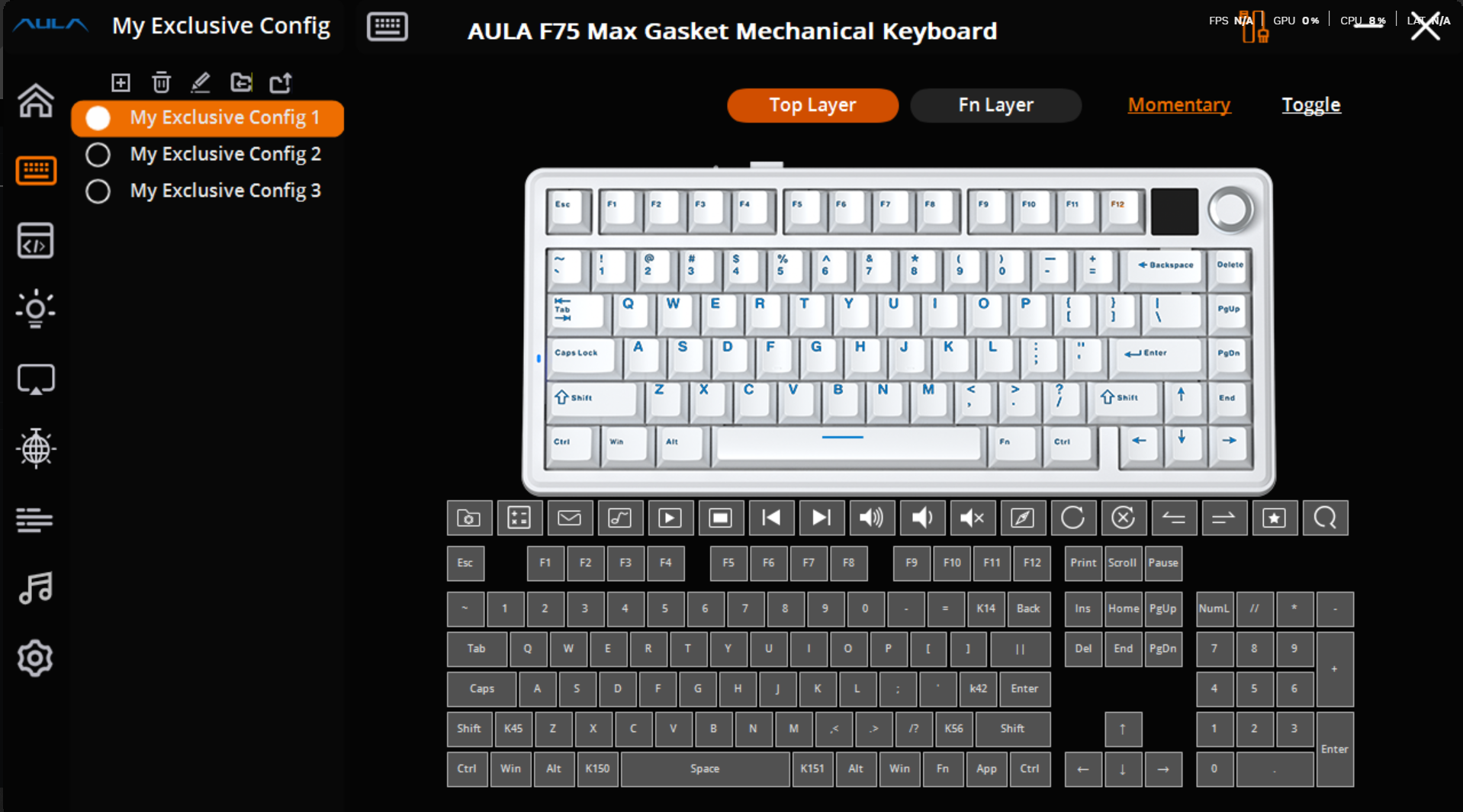

The Aula F75 Max has a downloadable driver, which allows you to customize everything from adding macros, to a custom gif on the TFT screen. I have to note that the option to customize the screen is only available with a wired connection. Regarding customizability, Aula did a great job at adding the RGB controls into the TFT screen which allows you to adjust the RGB Effect, Colour, Brightness, Speed all with the knob. So if you want to turn off RGB or change any of its variables, you don’t need to go into the software to do that.


Using the knob, besides regulating the RGB Settings, you’re able to toggle between different Operating Systems featuring both desktop and mobile OS, TFT screen UI language, and volume. In my use I found regulating volume with the knob to be most useful. By default the TFT Screen displays a screen featuring the Time, date, battery, as well as whichever OS is selected and connectivity method. I find this great since you get some info on date and time, and can keep track of battery at a glance without having to check software to know when to charge.
Conclusion:
This is one of the best mechanical keyboards you can get for $80, you get a great typing experience that rivals keyboards twice its price, features such as tri-mode connectivity, a TFT-screen, and a knob, with very good build quality.
Who would I recommend this to?
Do not get this keyboard if you plan to use it for competitive games where you think you would be able to take advantage of magnetic switches. Despite the fantastic feel of this keyboard, not having magnetics switches and their benefits will leave you at a disadvantage in competitive games.
I do recommend this keyboard for those looking for a great typing experience. For $80, I do think this is the best, if not one of the best typing experiences straight from the box.
In my opinion if you don’t care about gaming performance, the only reason another keyboard would be a better option is if you are willing to spend more for a more premium feeling metal case, otherwise its hard not to consider the F75 Max as a keyboard worth buying.
Overall if you aren’t looking for gaming performance, but rather raw typing feel, I don’t think you can go wrong with this keyboard, it feels proper quality, and has a superb soft and creamy typing experience at a great value.
Pros:
- Tri-mode conectivity
- Great typing feel
- TFT screen & knob
- great build quality
- Great value at $80
Cons:
- not ideal for competitive gaming
- not necessarily a con, but it has an ABS plastic build, which feels high quality and expected at this price, but not as premium as a metal build