

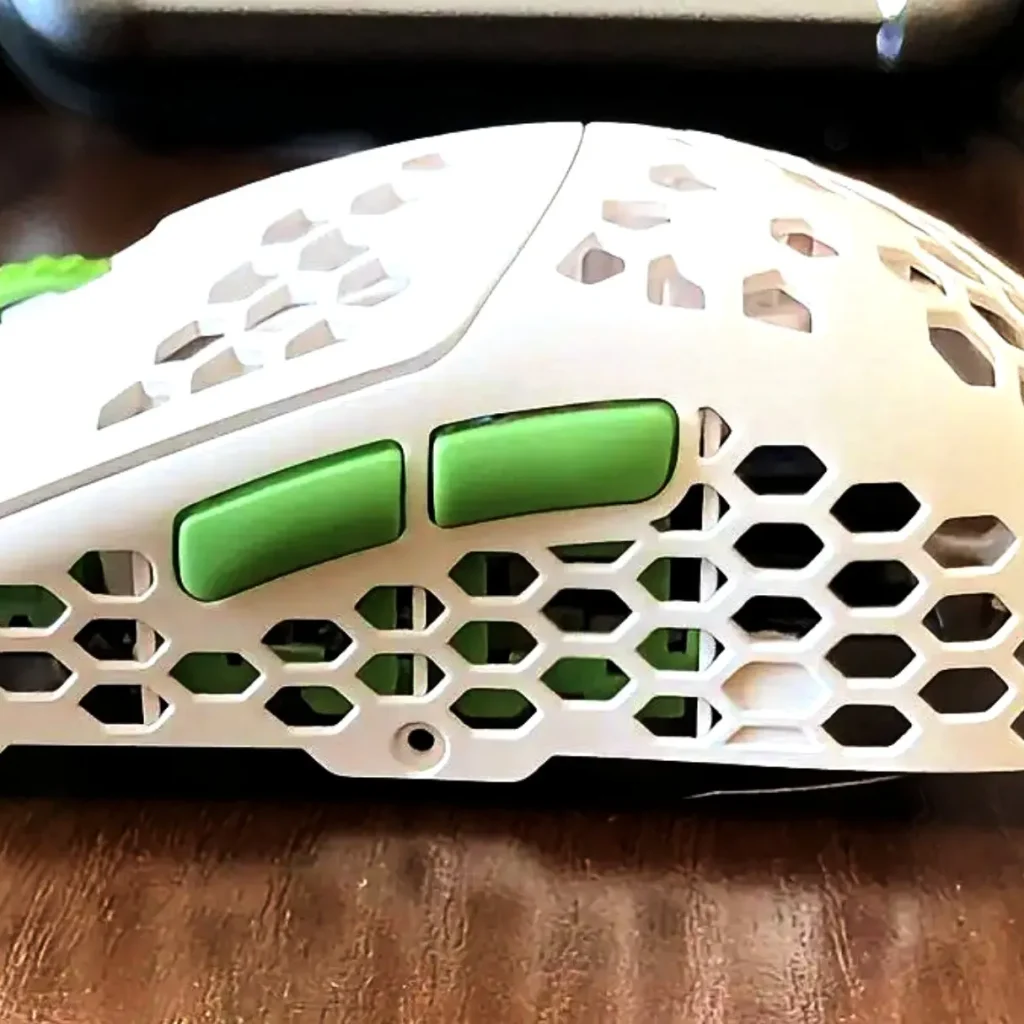
I thought I knew what to expect when I received the Hati S2 Pro. Another Hati, just smaller, right? Turns out… not really. The shape hit me right away, but I’ll get to that in a second. All I can say is it feels different and kind of cute in a strange way.
Disclaimer: This unit was provided to me for testing purposes, though G-Wolves had no sway over the contents of this review.

Scenarios
Testing time: 2 weeks
Hand size: 21 x 12 cm
Grip: fingertip grip
Humidity: 55–60%
Skates: stock skates, control Black Aetherium skates, felt skates from 2DudezGaming
Mousepads: Artisan Hien Soft, Ninjutsu NPC Pro Control, Tenta-X BerryMilk
Games: Battlefield 1, Battlefield V, QuakeWorld, Doom Eternal.
In the box


- Hati S2 8k Pro
- USB-C to A data cable
- 8k dongle
- G-wolves 3d card
- USB-C to A braided cable
- carrying pouch
- two different leashes (a long one and a short one)
- different skates, also dots
- carrying case
- manual
- grip tapes
- stickers to secure the bottom of the mouse
- foams to install a battery
Bottom line? Massive package, as usual.
Specs and Dimensions

Bottom line? Top specs, great latency, exceptional performance
Unboxing
Shape, Build Quality, and Design — “The Baseball Cap”
When I got the Hati S2 Pro, I was sure it was just a Hati S but smaller. The name kind of says that. Same lines, same feel, just shrunken down. But the second I took it out of the box, I knew something was off. The shape wasn’t what I expected. Looked a bit familiar, but also not. I even stopped and stared at it for a moment, like… wait, what?

In hand, it felt even stranger. Not like the Hati S at all. More like this tiny baseball cap. Round in the back, a little bulky, with that dome that changes the whole grip. Weird comparison, maybe, but once it crossed my mind, I couldn’t shake it. That’s where the baseball cap vibe comes from.
In a claw grip, the hump gives you something to lean on. The mouse feels like it props your hand up. It’s stable, almost locked in, which can be nice if you like that extra support.

On the fingertip, it feels different. The back fills the hand more than I expected. Not in a bad way, just fuller. You don’t get that super flat, sharp feel of the Hati S. Some will love the added body, some will prefer the old style.

For palm grip, it’s a stretch. The mouse is still small, so only smaller hands will be able to manage it. The hump does help a bit, but this mouse was clearly designed with both claw and fingertip use in mind.
Overall, the shape feels new. It’s not just “Hati S, but smaller.” It’s its own thing. And once you see the cap comparison, you’ll never unsee it.

After a few days, my grip on this mouse somehow changed from finger tip to relaxed claw, where I managed (barely) to rest the back hump against the back of my palm. It wasn’t the case for all my gaming time because the mouse is still too small for that, but it somehow gravitated to it naturally in my case.
Interesting that G-Wolved decided to place the back skates on that visor. By doing so, you will never touch this part of the mouse that holds the back skates — that should be beneficial to the finger tip users, then.

The shell feels tight and solid — no creaks, no rattles. That’s because the PCB itself adds some stiffness to the whole body. The holes all over the shell, even cut into the skates, are one of those love-it or hate-it things. They cut the weight down nicely, but for some people, they might look odd or feel less comfy. Personally, it doesn’t bother me.
As usual with G-Wolves, there’s no DPI button, unfortunately for me. The ON/OFF button is also underneath the mouse. The mouse also uses a thumb rest below the side buttons, which I really like.
Bottom line? Very interesting shape, still finger tip though. The build is very solid as usual.
Coating and Weight

G-Wolves got roasted before for their coatings, but honestly, with the Hati S2 Pro, I don’t really see the same thing. Mostly because… well, there’s almost no coating at all here, which kind of surprised me. On the old Hati S2, it felt a bit chalky; this one feels more on the slippery side. Still, the honeycomb shell gives enough grip if your hands aren’t sweaty. And don’t forget they throw in those grip tapes, which are actually really solid and make it nicer to hold.
For me, it never became a problem anyway, since I don’t even rest my whole hand on the mouse — my style is basically hovering, only the back of my palm makes contact, and then my fingers.

Now, about the weight. Everyone knows the Hati S2 Pro is ridiculously light, around 28 grams, but I shaved it down to 26 just by swapping the default skates for four little dot skates. The mouse is noticeably front-heavy, even though the battery sits at mid-back. Also, the sensor isn’t centered — it’s sitting more forward, I’d say around a 65/35 split, so that may be the reason.
Bottom line? Almost no coating, but the grips improve it a lot. The mouse is a bit front-heavy.
Software and Battery Life

The browser software is actually a nice touch, easy to get into, no drama. I gotta say, G-Wolves’ software in general is one of the better ones I’ve used — fast, clean layout, and the UI just makes sense to me. They’ve come a long way in the last couple of years. The only pain is, every time I wanted to change DPI, I had to go into the web tool. That’s not really the software’s fault, more of a hardware design choice that’s annoying.
Battery side: it’s a 250 mAh pack, and I’d call it decent. I’ve been running it at 2000 Hz nonstop, gave it a full charge out of the box, and with my ~8 hours daily play, it lasted around 2–3 days, so let’s say 20 hours total. Not terrible. Using mechanical switches instead of opticals probably helps a little on power draw, but still, when I jumped between 2k and 4k Hz (firmware 1.0.39), I didn’t see a big difference. It would be nice if it lasted longer, but I get it — G-Wolves is obsessed with shaving grams off.
Bottom line? Smooth software, decent battery.
Buttons and Clicks

The main clicks on the Hati-S2 Pro? Honestly, really good. Way better than what I had on the regular Hati S2. No pre-travel at all, and basically no post-travel either — just a solid, sharp response when you press. They’re using Huano blues (clear shell, pink dot), and the implementation here feels spot on.
The actuation is even across the main buttons, so it doesn’t matter where you press; it feels the same. There are no grooves on the main buttons that could help in clicking, but I didn’t feel that I needed them here.

The side buttons are also great, no complaints there, and the wheel has that nice chunky tactility to it, super satisfying to click. Size and placement of the side buttons are well thought out, too — you can just roll your thumb over and they fire without effort.
I’d put these clicks up there with the Incott G23 v2 — definitely some of the best I’ve touched recently. Really enjoyable.
Bottom line? Exquisite clicks by G-Wolves.
Skates

G-wolves mapped the mouse by using 2 dots at the top and one bigger skate at the bottom, which, to my surprise, is also filled with holes. I wonder why, but it was probably to keep the skates in line with the rest of the mouse design. Also, this bigger skate is placed entirely on the small visor that protrudes from the mouse, making it look like a “cap”. It’s still cute, though.
The skates are well-rounded, pretty fast, as I’ve said, and are 0.7mm thick. They glide very well, but I wanted something slower, so I decided to replace them with Aetherium Black Control dots, which compensated for the superlight weight and my new glasspad. The general rule of thumb works here, too: experiment with different skates for your mouse, and your glide will be totally different. Hati S2 Pro works even better with slow skates, as your muscle memory will not make you overshoot that much.
I’ve also tried black, controlled skates from Aetherium and felt skates from 2DudezGaming, but since it’s not included in the box, I won’t elaborate, but you need to know that they are incredibly controlled, especially the felt skates.
Bottom line? Well-rounded, fast glide. A lot of other options apply here.
Performance

On clicks, running 4k or even 8k with debounce at zero, you’re looking at around 0.5 ms latency, which is insane. Polling rate doesn’t mess with click latency at all. The only thing is, if you lift the mouse and then click, you get that extra ~16 ms tacked on from lift-off detection, but honestly, you don’t notice it in real use.
As for the sensor — Pixart 3950, here is rock solid. No spin-outs, no random cut-offs, LOD feels spot on, and responsiveness is right up there with the best. Click latency stays low across all polling rates. If you care about battery, though, I’d say stick to 2k or 4k — feels the most consistent anyway. Just keep in mind Motion Sync adds about 0.5 ms, so there’s that.
Bottom line? You cannot find any flaw here.
Summary
I had some initial adaptation time with this mouse, but that’s pretty normal when jumping from a “potato-shape” mouse like Incott G23v2. I started using it with my finger tip grip, but as usual, I failed to perform well, and I was quickly frustrated enough to switch to my relaxed claw grip.
After a few days, the mouse grew on me radically — I was able to position my grip comfortably and correctly to my gaming style, and my movement, flicks, and tracking improved significantly.

I also really enjoyed the lightweight, and switching to a heavier mouse immediately felt awkward to me. In my opinion, the key to success with such mice is to properly mitigate the initial shock and overshooting by using an adequate mousepad and correct mouse skates. After that, you only need to give it time.
Perhaps the battery life could be better, and for some, the coating should be different — but honestly, these gripes are unimportant, aren’t they?
I’ve had a few G-wolves mice so far: HSK Pro, Hati R, both Fenrir Max and Asym, Hati S, and this one is my favourite so far — not only does it look great, but also performs totally up to my expectations.
I suggest once you get it, you should “leave that cap on!”
Bullet Points

- My favourite G-Wolves mouse so far
- still a very good fingertip mouse, despite being so different than the Fenrirs
- Good option for claw/relaxed claw grip users with mid/small hands
- Even with the super lightweight (26gr after applying the dot skates), the quality and build are superb
- Very generous unboxing, as usual
- The “cap” design is cute, the white/green colorway even cuter
- Mechanical clicks are implemented very well (Huanos 80mln)
- All buttons are great, no pre/post travel, no wobble, no side-play
- very low click latency, with the slam-click prevention (adds around 16ms latency)

- There’s basically no coating on the mouse, but it’s not slippery either, and the included grip tapes are terrific
- The scroll wheel is great, one of the side buttons has pre-travel, though
- True 8K wireless polling rate and excellent sensor performance that…
- …is positioned towards the front of the mouse
- This mouse excels in fast-paced games
- Tracking is flawless in general, but also effortless on glass
- Almost no coating can be an issue to some, but the grips are great
- Excessive holes, including in the skates

Get the Hati S2 Pro now from the official site — use code “airmanthe” for a discount!
Disclaimer
This review is not a paid endorsement. I want to ensure transparency and let you know that I am not receiving any compensation, monetary or otherwise, for evaluating or discussing this tech product.
