

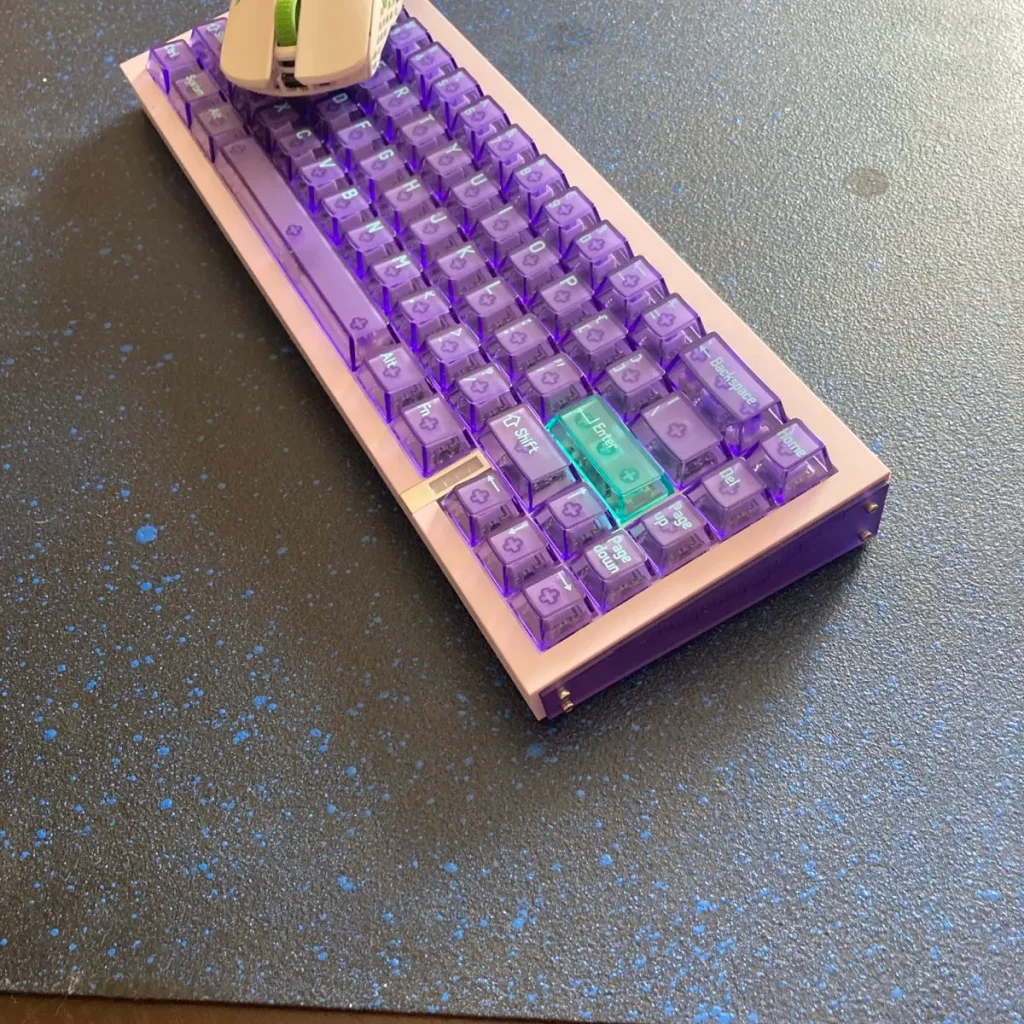
Melgeek has been pushing magnetic keyboards for a while now, and the Real67 is their latest shot at the 65% layout. On the surface, it looks familiar, but it isn’t just a repeat of what they’ve done before. This board leans into a cleaner design, translucent caps, and a lower entry point that makes it easier to get into Hall-effect switches without going straight for the premium tier. It’s not about reinventing the wheel — it’s about reshaping a popular format in Melgeek’s own way.
Disclaimer: This unit was provided to me for testing purposes, though Melgeek had no sway over the contents of this review.
Unboxing
Sound Test
What’s in the box?


- Real67 Magnetic Keyboard
- USB-A to C braided cable
- Quick Guide
- Melgeek stickers
- Keycap puller
- Brand card
- 5 extra keycaps
Bottom line? Lack of a switch puller surprised me.
Specs and Features


Bottom line? Everything a modern magnetic should have, you will find here.
Design and Build Quality

The Real67 is a 65% layout (67 keys) magnetic keyboard that comes in four versions: Potassium Purple, Calcium Gray, Silicon Gray, and Sodium White. The difference isn’t just color — the side panels change too. Some use plastic, others use aluminum. You feel it right away. The aluminum ones have more weight and feel solid; the plastic ones are lighter but give a bit under pressure. Not a dealbreaker, but noticeable.
The design is typical Melgeek. Translucent keycaps let the RGB shine through, and it looks great in darker setups. There are 12 lighting modes built in, so you can flip through effects without touching the software. The side panels are swappable as well, which is a nice touch if you want to change the look later.

The typing angle is fixed at 6.5 degrees, no kick-out feet, just rubber feet. There is an LED close to the CapsLock and Mood Light bar below the right Shift key.
Build quality is solid for the price. The gasket mount (that is on the harder side, though) gives the board a softer feel and takes the edge off the sound. Stabilizers are tight and don’t rattle, which is always a win. It doesn’t carry the same heft as a full aluminum premium board, but it also costs much less. Overall, it feels well put together with no glaring weak spots.
Bottom line? Incredibly solid for the price asked, the looks are pretty stunning as well, the gasket mount is hard though.
Keycaps and Switches

It seems to me that PC Translucent keycaps are getting more and more popular these days, not without a reason. The material used is Polycarbonate (PC), and its transparency boosts RGB visibility pretty well. Don’t go over the top with the lights, though; they look the best at average light saturation.
Their other pro is that you won’t see any shine develop on them easily — that’s why they are translucent, so there’s your other aesthetic advantage.
I could only argue that the choice of this specific font is debatable. But there’s no accounting for taste, I guess.

The TTC SacredHeart KOM switches are well-made, with excellent stability (low wobble), snappy rebound, and a pronounced clack. They seem especially appealing for those who enjoy audible feedback, high build quality, and are willing to tweak things (lubing, case/foam mods).
For fast gaming, they seem to do well, and also decent for typing, though if you’re after a very quiet or deep sound, or a very “tactile” experience, these might not hit those extremes out of the box.

I also tested WS Flux switches as usual, and they fit well (even though they are not supported by software yet); however, their sound is even more pronounced and clacky. They are also incredibly stable, but that’s nothing new.
Software

The web-based software of Melgeek and the desktop version are called Hive, and it has greatly improved since last year when I reviewed MadeAir68. First of all, it is well-thought-out and designed, the UI is pretty intuitive, and the whole experience is actually… painless and smooth. Seriously, there are even good explanations for noobs on Advanced Keys, which is very welcome; however, some options like Mod Tap, etc, are hidden within the Advanced Key section.
You can do almost everything there, from simple key remapping, through per-key RGB settings, profiles (they can also be toggled by key shortcuts), and firmware updates. But there’s more: you can also use pre-set pro player profiles by simply clicking them, you can auto-calibrate switches, etc.
Obviously, there are also settings on Rapid Trigger and other sensitive tweaks. Actuation Point can be set down to 0.1mm, and Rapid Trigger goes as low as 0.01mm; you can also tweak the Dead Zone. Even though Melgeek warns us about its instability, it’s due to human nature, so don’t go over the top with it.
Some most advanced features will be there probably in the future, but what you get is perfectly fine.
Bottom line? Sleek and fast software, almost everything is up and ready! Very frequent updates make Melgeek a trustworthy company, as well.
Latency and Performance

Performance-wise, the Real67 held its ground really well. At this level, once you step into the premium bracket, the differences between boards get so small that it’s hard to tell them apart. For casual players, you won’t notice much at all — it’s already more responsive than you’ll ever realistically need. Still, the numbers back it up: per-key latency sits around 0.21 ms, which is right at the top of what’s out there. In actual use, it translated into smooth gameplay with no dropped inputs, no cut-offs, and no strange behavior. Everything just worked, which is exactly what you want in the middle of a game.
What stood out to me was the consistency. Every press felt clean, and the board never made me second-guess whether it would register a quick tap or a half-press. For competitive gaming, that’s reassuring — you can focus on the match instead of your gear. That said, personal preference still plays a huge role. I lean toward the EZ63, mainly because the X-Magnetic switches have a feel that matches my style almost perfectly. But that’s not really a flaw in the Real67, more just a reminder that at this end of the market, “better” often comes down to taste rather than raw performance.
Bottom line? Performance is among the best in the industry.
Closing Thoughts

The Real67 isn’t here to reinvent the category. It builds on what Melgeek already knows, but tightens things up enough to feel fresh. Performance is very solid, typing feel is good (but not silent), customization is there if you want it, and the price hits a nice spot. Of course, there are a few quirks, but nothing that kills the experience unless you’re super picky.
I basically couldn’t find any major flaws, apart from some occasional drawbacks that were hard to reproduce (for example, that RGB reset I mentioned), and it didn’t turn me off, to be honest. Gaming was good, typing was almost typo-less, the looks are great, and the website is very good.
It’s one of those boards that feels like you’re getting more than you paid for, especially at the entry price — and even more if you spring for the aluminum or premium finish. Not a game-changer, but a well-rounded, accessible way into magnetic keyboards with a strong mix of looks, features, and value.
Bullet Points
- It’s basically a stripped-down version of Made68 Ultra, at a more affordable price
- flawless performance over the period tested
- really low latency around 0.21ms per key press
- real 8k polling rate
- Very sleek looks and colorways, panels swappable with MADE68
- The gasket mount is on the stiffer side
- PC translucent keycaps are pretty and fit great with the overall aesthetics, but the font can be weird to some
- TTC Sacred Heart KOM switches are box-mounted, they are crisp and bright in sound, and they rebound fast

- clean and pristine typing sound and a pleasant typing experience (6.5 degrees typing angle), however, this is not a silent keyboard
- hot-swappable, even with switches that are not officially supported by the software
- The web-based and desktop Hive software is really good and works fast — even RDT (quick stop) is there (very useful in CS2), and advanced AI scripts to adapt to your typing/gaming habits
- There’s some minimal wobble on the switches, though
- The lack of a switch puller in the box might disappoint some
- Sometimes, RBG went to default after I reconnected the keyboard
Get this keyboard from the official Melgeek website
Disclaimer
This review is not a paid endorsement. I want to ensure transparency and let you know that I am not receiving any compensation, monetary or otherwise, for evaluating or discussing this tech product.

